Programming Languages
What is a Programming Language?
A programming language is a formal notation for communicating a set of instructions to be performed by a computer.
In a general sense, this definition could also be applied to scripting languages and markup languages. The key distinction is that the term "programming language" is generally used to describe languages that can express all possible algorithms. By contrast, a scripting language is usually confined to a specific set of instructions that can be used to automate the behavior of a specific run-time environment such as design tool or game authoring platform. A markup language like XML is used to define structured data such as a document layout rather than programmatic logic.
The idea that a programming language can express "all possible algorithms" is a complex and nuanced distinction related to the concept of Turing Completeness. In brief, a system is said to be Turing complete if it can simulate the behavior of a Universal Turing Machine and can therefore solve any computable function.
In this sense, any program that can be implemented in one programming language should theoretically be implementable in any other programming language. In practice, however, each programming language has its own strengths and weaknesses that will make it more or less conceptually straightforward to express a particular program in a given language.
The description of a programming language is generally split into two components: syntax and semantics.
Syntax: A language's syntax is comprised by a set of rules that describe the symbols and symbolic relationships that can be used to compose a valid program. Syntax only deals with the form and structure of the language and not with the meaning implied by those structures.
Semantics: A language's semantics defines the meaning associated with each syntactically valid expression and is comprised by a set of rules that describe the machine's expected behavior in relation to those expressions. The term static semantics is used to describe behavioral restrictions that can be known before the program is run (generally at compile-time). Dynamic semantics describe behavioral restrictions that are imposed in relation to user-supplied data during runtime.
Machine Languages
"Looking at a program written in machine language is vaguely comparable to looking at a DNA molecule atom by atom."
— Douglas Hofstadter1
At the lowest level, a computer program is comprised by a set of instructions that describe very basic tasks to be performed by the computer's CPU. These instructions relate to tasks such as loading a value into a specific register (a small storage unit within the processor) or adding the values stored in two registers and storing the result in a third register.
Since different CPUs are implemented differently, each family of processors tends to come with its own unique instruction set, which is designed to make the best possible use of the hardware's capabilities. Some simple processors are only capable of executing a single linear sequence of instructions while others can execute several simultaneously. As a result, machine code that has been generated for one kind of processor is unlikely to run on any other kind of processor. For this reason and because machine code is designed for CPU consumption rather than human-readability, it is almost never written directly by a human programmer.
Assembly Languages
An assembly language is an extremely low-level programming language that generally provides the same instruction set as a machine language, but provides a symbolic (rather than pure binary) representation of the code in order to improve human-readability. Like its machine language counterpart, an assembly language is tied to a specific processor architecture.
Assembly code is converted to machine code using an assembler. As higher-level languages have emerged, software complexity has grown, and the range of available processor architectures has widened, it has become less practical or desirable to develop entire applications in assembly.
"High-Level" Languages
Once upon a time, a programming language such as Fortran or C was considered "high-level" in contrast with an assembly language.
Here is a "Hello World" program written in an assembly language:
section  .text
   global _start       ;must be declared for linker (ld)

_start:                ;tells linker entry point
   mov  edx,len        ;message length
   mov  ecx,msg        ;message to write
   mov  ebx,1          ;file descriptor (stdout)
   mov  eax,4          ;system call number (sys_write)
   int  0x80           ;call kernel

   mov  eax,1          ;system call number (sys_exit)
   int  0x80           ;call kernel

section  .data
msg db 'Hello, world!', 0xa  ;string to be printed
len equ $ - msg              ;length of the string
And here is "Hello World" in C:
#include <stdio.h>
int main()
{
  printf("Hello, world\n");
  return 0;
}
If it seems inconceivable to write software in assembly, this is in part because the things we want a piece of software to do have grown exponentially. And so begins our story of tools building on top of other tools.
When we issue a single command such as printing text to the console or drawing a line segment to a graphical context in a language like Processing, we are actually evoking countless instructions at lower levels that were written by someone else at an earlier time. So long as we are happy with the decisions made for us at a lower level, we can simply stand on top of them and focus on the higher-level decisions relevant to our application.
Anatomy of a Programming Language
Compiled and Interpreted Languages
Compiled Languages: In a compiled language, the human-readable source code is converted to machine code by a utility program called a compiler. Programmers must compile a program each time they make changes to the source code. Many modern compilers perform automated optimizations while converting the source code to machine code. Some of the more popular compiled languages include: C, C++, Haskell, Rust and Go.
Interpreted Languages: In an interpreted language, the source code is not converted to machine code. Instead, when the user runs a program, the interpreter will decode each line of the source code and execute the associated command directly. In recent years, many interpreted languages now use a process called just-in-time (JIT) compilation. Some of the more popular interpreted languages include: PHP, Ruby, Python and JavaScript.
Static and Dynamic Type-Checking
Static Type-Checking: In a statically-typed language, a variable's type is verified at compile-time. This approach makes it easier for programmers to find type errors during the development process. Popular statically-typed languages include: C, C++, Java and Scala.
Dynamic Type-Checking: In a dynamically-typed language, a variable's type is verified at runtime. Dynamically-typed languages enable numerous desirable features such as generic containers and metaprogramming techniques. Popular dynamically-typed languages include: PHP, Ruby, Python and JavaScript.
From Source Code to Runtime
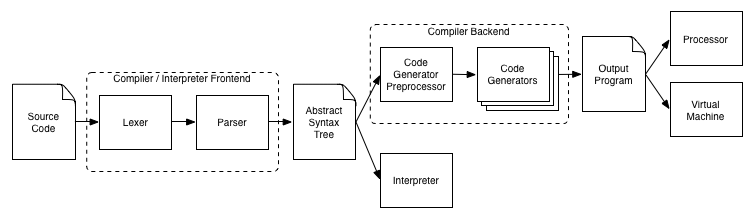
Lexer: The lexer splits the source code into individual lexical tokens and identifies each token's type. Sometimes called a Tokenizer.
Parser: The parser applies a set of syntactical rules to the token sequence in order to identify syntax errors and translate tokens into an abstract syntax tree.
Abstract Syntax Tree (AST): An AST is a language-independent data structure that provides a hierarchical representation of the parsed program's components. Sometimes called a Parse Tree or Intermediate Code Representation.
Interpreter: In an interpreted language, the interpreter executes the AST.
Code Generator: The code generator converts the AST into the target language, which is generally machine or assembly code.
Virtual Machine: In a compiled language, the generated code is executed directly by the processor or by a virtual machine, which simulates the behavior of a processor.
Native and Non-Native Applications
Native Application: A native application is a piece of software that has been compiled to run on a specific family of processors and whose execution is facilitated directly by the operating system.
Non-Native Application: A non-native application is a piece of software whose execution is facilitated by an application other than the operating system itself. This includes web apps and software written in certain programming environments such as Matlab, Scratch and Max/MSP.
Libraries
Aside from the core functionality of a programming language, there are many additional features that may be deemed useful enough to include in the language itself rather than relegating them to the domain of a third-party library.
C++ Standard Template Library
The C++ language ships with several "built-in" libraries, such as the Standard Template Library (STL), which extend the language's functionality to include commonly-used data structures and algorithms. The STL container types include:
- vector: a dynamic array, capable of random access with the ability to resize automatically when inserting or erasing an object.
- list: a doubly linked list; elements are not stored in contiguous memory.
- set: a mathematical set.
- map: an associative array; allows mapping from one data item (a key) to another (a value).
C++ Boost Libraries
The Boost Libraries offer a wide range of functionality. Boost is often considered a holding pen or proving grounds for features that may eventually be added to the language itself. As the Boost documentation says, "In a word, Productivity. Use of high-quality libraries like Boost speeds initial development, results in fewer bugs, reduces reinvention-of-the-wheel, and cuts long-term maintenance costs."
Package Managers
In order to give programmers the ability to easily share the code they write with others, many programming languages have so-called package managers: a system to upload code that you have written so others can use it. A collection of code can have many names: module, package, library, framework. All of these words basically mean the same thing: it's just code (functions, variables, etc.) that other programmers have written so you don't need to write it from scratch.
Node Package Manager (NPM)
The NPM project is not a part of the official language: it was created when Node (server-side JavaScript) was released. NPM encourages packages with small focus and high use of dependencies. NPM enforces semantic versioning. NPM is now the preferred way to share JavaScript code, whether for the server or the browser.
Golang Packages
Package management is built into the Golang programming language. There are no package servers: Go packages install directly from GitHub, BitBucket, or any other URL where the code is stored. Go relies on GitHub for documentation. The official Go stance is never to change the API of a published package.
Domain: The Browser
To say that a package or program is domain-specific, is a fancy way of saying that the code was written for a specific platform. Because it's a center of focus for many projects at ITP, let's have a look at the browser as an example of a specific domain.
To allow computers to exchange electronic documents (the internet), three crucial things had to be established:
- A way for a computer to request a document from another computer. Solution: HTTP requests.
- A special way to format what computers are sending to each other. Solution: HTML.
- A way for the receiving computer to display the received data: The browser.
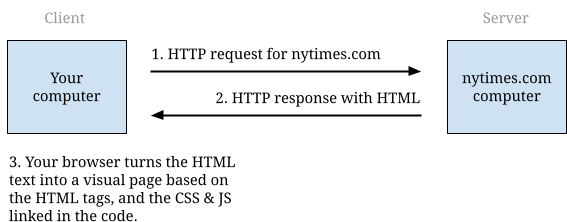
HTML is a great language for creating user interfaces. CSS provides a very flexible way for programmers to style their documents. You only need a little bit of JavaScript to write fully functional programs. The newest HTML5 standard introduces a lot of tags that would be hard to implement from scratch in other languages.
Although browser-based applications are good for many things, they are not necessarily a good domain for image or video manipulation or machine learning. However, the browser has become such a powerful domain that programmers are using it to create software even though the software is not a web application. Electron is one example of this, wrapping a browser in a binary package that can be executed on Mac or Windows. Examples include the Atom Text Editor and Slack.
Conclusion
As we begin to develop our own tools in this class, it's important to first focus on the use case — what is the reason for this software to exist? — and then choose the proper place for it to live in this software landscape. Many projects at ITP are created using HTML / CSS / JS, but this is not necessarily the proper domain for everything.
Notes
- D. Hofstadter (1980). "Gödel, Escher, Bach: An Eternal Golden Braid": 290.